
Technology
18 min read
Dell Pro Max Tower T2: A Deep Dive Review for Power Users
ITPro
January 21, 2026•1 day ago
AI-Generated SummaryAuto-generated
The Dell Pro Max Tower T2 is a powerful desktop designed for professionals handling intensive tasks like AI workloads, virtualization, and visual design. It features an Intel Core Ultra 9 285K processor and can be configured with an NVIDIA RTX PRO 6000 Blackwell Workstation Edition GPU. While high-end configurations exceed $10,000, cost-effective options are available for most users starting around $1,000.
Amid the rise of hybrid work, bring-your-own-device (BYOD) policies, as well as increasingly portable devices like mini PCs and ultraportables, the thought of integrating a tower-style desktop into the workplace (or your home office setup, for that matter) may feel redundant. But don't underestimate the mighty tower PC; when intensive tasks demand more power and running AI workloads at full pelt is increasingly common, there is no point in compromising.
Designed for professionals who crave reliable high-end computing and flexibility, Dell's Pro Max Tower T2 is designed for those who need a machine that can handle virtualization, visual design, content production, and simulation, among other use cases, thanks to an NVIDIA RTX PRO 6000 Blackwell Workstation Edition. It's also engineered to handle and optimize AI-driven workflows, with an Intel Core Ultra 9 285K processor powering it.
It's worth noting this configuration is priced north of $10,000, but you can pick up a base machine for much less – starting at closer to $1,000, with ideal configurations for most users priced at between $1,500 and $3,000 depending on the components and optional features.
Dell Pro Max Tower T2: Design
Dell adopts a familiar 32L chassis size for its Pro Max Tower T2 desktop (that's a casing with an internal volume of 32 liters), meaning it makes for a fair balance between larger desktop PCs that could top 40L sizes and more compact sub-20L desktops. Overall, this design doesn't overburden your desk space while giving you plenty of airflow and access to hardware within.
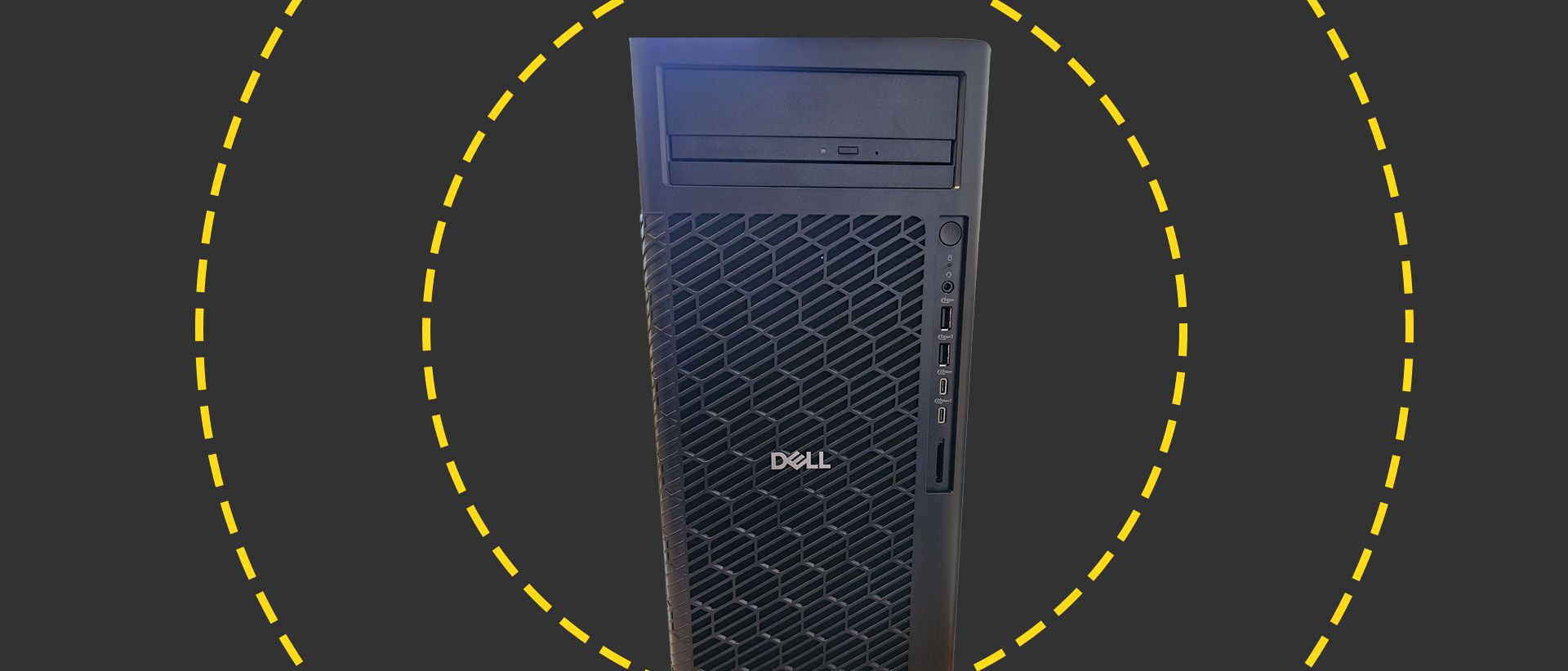
The tower comes shipped with a full-length grill that you can clip onto the front of the machine to aid with ventilation. This is especially crucial in managing heat in high-wattage configurations, especially if you have a machine with large-core CPUs or high-end graphics cards, like our review unit. Aesthetically, this massive grill also adds some character to an otherwise bland black box. It's also easy to get into the box, thankfully, with a side latch that means you won't need to tear down the machine to get inside – either to maintain the components or upgrade any over time.
Dell Pro Max Tower T2: Connectivity and Features
Atop the front-facing side of the Pro Max Tower T2, there's room for two optional features that could prove useful if handling legacy media: an optical disk drive and a 3.5-inch lockable storage bay. Beneath that, you'll find the power button followed by an LED status indicator, a 3.5mm headphone jack, two USB-A 3.2 Gen 1 ports (the lower with PowerShare), as well as USB-C 3.2 Gen 2 and USB-C 3.2 Gen 2x2 (with PowerShare) ports.
The rear side depends on which optional ports you choose – and the beauty of this machine is that you can select from a wide variety of options – but will include a power connector port at a minimum, two DisplayPorts, a USB-C 3.2 Gen 2x2, USB-C with Thunderbolt 4, and four additional USB-A ports (two USB 2.0 ports and two USB 3.2 Gen 2 ports). You'll also get an RJ-45 Ethernet port, which supports up to 1 Gbps internet speed.
Optionally, you may choose one from the following selection: HDMI 2.1 port, VGA port, two USB-A 3.2 Gen 2 ports, a USB-C port with DisplayPort, a USB-C 3.2 Gen 2 port with Thunderbolt 4, a 5GbE LAN NIC, and another DisplayPort 2.1 port. There's also no wireless card in the machine by default, so you'll have to pay extra for Wi-Fi 7 2x2 and Bluetooth 5.4 support courtesy of either an Intel or Qualcomm chip.
Dell Pro Max Tower T2: Performance
The processor at the heart of our review configuration was the 24-core Intel Core Ultra 9 285K processor, a power-efficient and versatile high-end CPU that's optimized for AI and creative workloads. With a frequency of 3.7 GHz (with a maximum of 5.7 GHz), 16 efficient cores, and eight performance cores, it's a formidable upgrade to the Intel Core i9-14900K, previously one of the top desktop CPUs.
Data from Geekbench 6 confirms really positive results, with an improvement over its predecessor; it scored 3,202 in single-core performance as well as 22,583 in multi-threaded performance – a decent gain on the i9 predecessor. While plenty of AMD processors can outpace it – including multiple chips in the AMD Ryzen Threadripper PRO series – the Intel chip represents fantastic value for money. Meanwhile, as far as memory goes, our review machine was fitted with 32 GB DDR5 RAM and two 1TB M.2 PCIE 35 Performance SSD modules. The SSD speeds are phenomenal, with reads of 12,008MB/s and writes of 12,674MB/s.
The GPU, on the other hand, is an unparalleled monster. Nvidia describes its RTX PRO 6000 Blackwell Workstation Edition as the most powerful desktop graphics card available – and benchmark data offers compelling evidence for why. That said, it'll cost you a pretty penny, and the vast majority of the cost of the machine is in this beast of a graphics card. Combined with the CPU and other specs, there's very little this can't handle.
Dell Pro Max Tower T2: Is it worth it?
The Dell Pro Max Tower T2 is about everything you'd expect from a modern desktop PC, with a plethora of connectivity options that can be customized to your liking as well as a vast choice of hardware to suit your specific needs – from integrated Intel Arc Graphics to the most powerful desktop GPU available.
The machine itself isn't much of a looker. The front-facing grill adds some much-needed flair to an otherwise bland design, but it does give really strong airflow and thermal management when called on. Given the classic 32L chassis design, as well as ease of access for maintenance or upgrades, it's a versatile box too.
While our review unit was one of the most expensive configurations out there, for most office users and professionals, you can easily customize a version of this device that will perform more than well enough for under $2,000.
Dell Pro Max Tower T2 specifications
Rate this article
Login to rate this article
Comments
Please login to comment
No comments yet. Be the first to comment!